Best TV for a Treadmill in 2026: 4 Practical Picks
Do You Need a Treadmill With a Screen?
We are working through this decision for our own treadmill setup. A built-in screen sounds convenient, but even a premium treadmill may give you a 10- to 16-inch display tied to one fitness platform. A separate 32- or 43-inch smart TV can cost far less, run the streaming apps you already use and stay on the wall when the treadmill eventually needs replacing.
The right answer depends on what you want to watch. If the goal is Netflix, YouTube, Prime Video, Crave or a training video, a separate TV usually makes more sense. If you want a coach on screen while the treadmill automatically changes its speed and incline, an integrated system such as iFIT has a real advantage.
Affiliate disclosure: This article contains affiliate links. RunningGearLab may earn a commission if you buy through one of them, at no extra cost to you. We have not personally tested these televisions. The shortlist uses current U.S. models, independent picture testing, manufacturer specifications and the features that matter in a treadmill room. Canadian versions may use a different model suffix. Prices and app support can change.
43″
4K Roku TV
Best for most runners
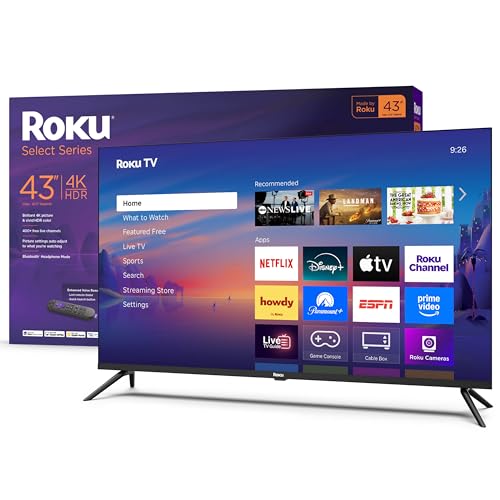
Roku Select Series 4K, 43-inch
The 43-inch Roku Select Series is the best fit for most treadmill rooms. It combines a simple interface, 4K resolution, Bluetooth Headphone Mode and a standard 200 x 200 mm VESA mount at a practical price.
Best starting size for roughly 4 to 6 feet away · Bluetooth Headphone Mode · Wall mount sold separately
Quick answer: For most runners, buy the better treadmill for running and add a separate TV. A television is cheaper and easier to replace than a treadmill console, gives you a much larger picture and does not lock your entertainment to one fitness membership.
Jump to:
TV vs treadmill screen Choose a size Top TV picks Comparison Mounting guide FAQ
Last fact-checked: September 2026
Jump to your pick
- Best for most runners: Roku Select Series 4K 43-inch
- Best picture value: Vizio Mini LED Quantum 43-inch
- Best Fire TV option: Hisense QD6QF 43-inch
- Best compact TV: Samsung Q8F 32-inch
Separate TV vs Built-In Treadmill Screen
Choose a separate TV if…
- You mainly watch normal streaming services
- You want a 32- to 43-inch screen
- You dislike treadmill-specific subscriptions
- You want to replace the screen without replacing the treadmill
- You also do strength or mobility sessions in the room
Choose an integrated screen if…
- You follow trainer-led workouts most days
- You want speed and incline to change automatically
- You want metrics beside the workout video
- You prefer one machine with no wall installation
- You are comfortable with its membership and software limits
| Feature | Built-in treadmill screen | Separate smart TV |
|---|---|---|
| Typical screen size | About 10 to 24 inches | Usually 32 to 55 inches |
| Workout control | Can control speed and incline on supported platforms | Video only; treadmill controls stay manual |
| Workout metrics | Can appear beside the class or route | Usually remain on the treadmill, watch or phone |
| Entertainment | Limited to apps and features allowed by the treadmill maker | Normal smart-TV apps, casting and HDMI devices |
| Membership | Full features may require a treadmill-specific plan | Pay only for the streaming services you choose |
| Replacement | Screen and treadmill are one purchase | Replace the TV without replacing the treadmill |
| Installation | No separate wall installation | Needs a compatible mount, outlet and secure cables |
Why a separate TV is usually better value
The Horizon 7.0 AT is a useful example. It has a 20 x 60-inch running belt, quick speed controls and a basic 7.25-inch workout display without a locked-in fitness platform. Add a separate television and you can get a larger entertainment screen while keeping the treadmill focused on running.
This is not a perfect price comparison. Treadmill quality, cushioning, warranty and motor response matter more than the screen alone. Start with the quiet treadmill guide, choose the machine that fits your running, then decide whether its console is worth paying for.
Where the built-in screen still wins
The NordicTrack Commercial 1750 has a 16-inch pivoting touchscreen. With an iFIT Pro membership, it can automatically adjust speed and incline to match a workout. A wall-mounted TV cannot do that by itself. The screen is also close to the runner, so 16 inches feels larger than it sounds.
Other treadmills handle screens differently. The Sole F80 has a 10.1-inch touchscreen with preset entertainment apps and screen mirroring, while the Echelon Stride 6s uses a 10-inch screen tied closely to Echelon content. Check what works without a paid membership before buying. A screen that looks impressive in a showroom may be much less useful after the trial ends.
What Size TV Works Above a Treadmill?
Measure from your eyes while standing in your normal position on the belt, not from the back of the treadmill. These ranges are starting points, not strict rules.
32″
About 3 to 4 feet away
Good for a tight room or a TV mounted directly beyond the console.
40–43″
About 4 to 6 feet away
The best range for most home treadmill setups.
50–55″
About 6 feet or more
Only useful when the TV is on the far wall of a larger room.
Do not mount it too high. Stand on the stopped treadmill in your running shoes and look straight ahead. The centre of the screen should be comfortable without tipping your chin up. A small downward-tilting mount can help when the console forces the television slightly higher.
Features That Actually Matter
- Bluetooth headphone support: More useful than powerful TV speakers when the treadmill is running.
- A simple remote: Voice search and large buttons are easier than typing while standing beside the treadmill. Pause the belt before changing apps.
- Your preferred smart platform: Fire TV, Roku, Google TV and Samsung Tizen all work, but their menus and app support differ.
- 4K at 40 inches and above: Worth having when the price difference is small. A 32-inch treadmill TV can still be fine at 720p or 1080p.
- VESA wall-mount support: Confirm the exact hole pattern and television weight before choosing a mount.
- Enough brightness for the room: A basement needs less than a sunny room with windows facing the screen.
You do not need OLED, a 120 Hz panel or expensive gaming features for treadmill television. A normal 60 Hz LED set is enough for shows, movies, YouTube workouts and race videos.
How we chose these TVs: We have not completed our own hands-on comparison. We started with current U.S. models, checked independent lab testing where available, and then judged each television for treadmill use. We favoured 32- and 43-inch sets with simple streaming, wall-mount support, reasonable prices, useful viewing angles and private-audio options. We did not reward premium gaming features that offer little benefit while running. Confirm the exact model number, VESA pattern, weight, app support and return policy before ordering.
Practical home-gym picks
The 4 Best TVs for a Treadmill
#1
Best for most runners
Roku Select Series 4K 43-inch
43″
Roku TV · 4K
- Model: 43R4E5
- Resolution: 4K UHD
- HDR: HDR10+ + HLG
- Platform: Roku OS
- Private audio: Bluetooth Headphone Mode
- VESA: 200 x 200 mm
The 43-inch Roku Select Series is our best pick for most treadmill rooms because it spends money on the features runners will actually use. Roku’s current U.S. model has 4K resolution, the main streaming apps, Bluetooth Headphone Mode and a clean home screen that is easy to use before a workout.
Roku lists the 43-inch model at the low end of this group. It has four HDMI connections, Ethernet, Wi-Fi and a common 200 x 200 mm wall-mount pattern. The 43-inch size works well when your eyes are roughly 4 to 6 feet from the wall.
This is still a basic direct-lit LED television, not a premium picture-quality pick. That is a fair trade for treadmill use. Its simple interface and private-audio feature are more useful during a run than perfect black levels or advanced gaming hardware.
What works
- Very good value for a 43-inch TV
- Simple Roku interface
- Bluetooth Headphone Mode
- Four HDMI connections
- Common 200 x 200 mm VESA pattern
Watch out for
- Basic direct-lit LED picture
- 43-inch version is not QLED
- Standard remote is simpler than larger Roku models
- Wall mount is separate
#2
Best picture value
Vizio Mini LED Quantum 43-inch
43″
Mini LED · 4K

- Model: VQM43C-1001
- Resolution: 4K UHD
- Backlight: Mini LED
- Panel: Quantum colour
- Platform: Vizio OS
- VESA: 200 x 200 mm
The 2026 Vizio Mini LED Quantum is the best picture-value pick in this size. RTINGS found that it outperforms other cheap 43-inch televisions, and its wide viewing angle is especially useful when a treadmill screen sits slightly above eye level.
Mini LED backlighting gives it better brightness and contrast than a basic direct-lit television. It also supports Dolby Vision, HDR10+ and 4K streaming. You do not need those picture features for an easy run, but they make sense when the television will also serve a full home gym or family room.
The compromise is the smart platform. Vizio OS carries the major services, but it has fewer apps and less flexibility than Roku OS or Fire TV. The set lists Bluetooth 5.2, but Vizio does not clearly promise Bluetooth-headphone output on the product page, so confirm that feature if private listening matters.
What works
- Independent testing supports its value
- Wide viewing angle suits higher mounting
- Mini LED brightness and contrast
- Dolby Vision and HDR10+
- Standard 200 x 200 mm VESA pattern
Watch out for
- Vizio OS has a smaller app selection
- Bluetooth-headphone output is not clearly specified
- Glossy screen can show direct reflections
- Primarily sold through Walmart
#3
Best Fire TV option
Hisense QD6QF 43-inch
43″
QLED · Fire TV

- Model: 43QD6QF
- Resolution: 4K UHD
- Panel: QLED
- HDR: Dolby Vision + HDR10+
- Platform: Fire TV
- VESA: 200 x 300 mm
The Hisense QD6QF is the strongest Fire TV choice in this shortlist. RTINGS calls it a solid cheap option that outperforms similar models, while Hisense includes QLED colour, Dolby Vision, HDR10+, Alexa voice control and built-in Bluetooth.
Choose it when you already use Prime Video, Alexa or other Amazon devices and want Fire TV without buying Amazon’s more basic 4-Series television. The current 43-inch U.S. model is light enough for many standard wall mounts, but its 200 x 300 mm pattern is less common than 200 x 200 mm.
Its main weakness for a treadmill is the narrower viewing angle. Mount it directly in front of the belt and use a small downward tilt if the screen must sit above eye level. The Vizio is the safer choice if the treadmill is noticeably off-centre.
What works
- Good value for a QLED television
- Fire TV apps and Alexa remote
- Built-in Bluetooth
- Dolby Vision and HDR10+
- Current and widely sold U.S. model
Watch out for
- Narrower viewing angle than the Vizio
- Mount should be centred on the treadmill
- Fire TV menus favour Amazon content
- Unusual 200 x 300 mm VESA pattern
#4
Best compact TV
Samsung Q8F 32-inch
32″
QLED · 4K

- Model: QN32Q8FAAFXZA
- Resolution: 4K UHD
- Panel: QLED
- Platform: Samsung Tizen
- Best distance: About 3–4 ft
- VESA: 100 x 100 mm
The Samsung Q8F is the best current 32-inch television we found, not merely the cheapest small screen. RTINGS ranks it as the best 32-inch smart TV and notes that it is one of the few models this size with full 4K resolution.
It suits a treadmill positioned about 3 to 4 feet from the wall, especially when a 43-inch screen would feel crowded above the console. Samsung’s Tizen system carries a wide range of apps and supports phone casting, while the light 32-inch cabinet is easy to place on a compatible mount.
The catch is value. Samsung lists it at a higher price than several good 43-inch televisions. Buy it only when you specifically need a compact 32-inch screen and care about 4K picture quality. If price matters more, a basic 32-inch Fire TV or Roku TV is enough for normal shows while running.
What works
- One of the few 32-inch 4K TVs
- Independent testing supports the pick
- QLED colour
- Broad Tizen app selection
- Compact 100 x 100 mm VESA pattern
Watch out for
- Costs more than many 43-inch TVs
- Not the best value for basic streaming
- Dark scenes can look washed out
- Samsung account needed for smart services
At a glance
Compare the Best Treadmill TVs
| TV | Size | Resolution | Smart system | Price band | Best for |
|---|---|---|---|---|---|
| Roku Select Series 4K | 43 in | 4K | Roku OS | $ | Most treadmill rooms |
| Vizio Mini LED Quantum | 43 in | 4K | Vizio OS | $$ | Picture quality and viewing angle |
| Hisense QD6QF | 43 in | 4K | Fire TV | $–$$ | Amazon and Alexa households |
| Samsung Q8F | 32 in | 4K | Samsung Tizen | $$$ | Small spaces without sacrificing 4K |
TV Features You Can Skip
- OLED: Excellent for a dark home theatre, but expensive for a treadmill room and unnecessary for workout videos.
- 120 Hz gaming panels: Normal television and streaming content is fine on a 60 Hz screen.
- A large soundbar: Start with Bluetooth headphones or the television speakers. A treadmill can overpower small differences in speaker quality.
- A 55-inch screen at close range: Bigger is not better if it forces your eyes and head to move around the picture.
- A full-motion arm you never use: A simpler tilting mount is often steadier and keeps the screen closer to the wall.
How to Mount a TV Above a Treadmill
- Finish the treadmill placement first. Level it, test the incline and make sure a folding deck can move without reaching the television or cables.
- Stand on the stopped belt. Wear your running shoes and mark the height where your gaze naturally lands.
- Measure the viewing distance. Use your eye position, not the treadmill’s total length.
- Match the mount to the exact TV. Check the VESA hole pattern, television weight and mount capacity.
- Use the correct wall structure. Follow the mount instructions for wood studs, steel studs, concrete or masonry. Do not install into drywall alone unless the mount is specifically designed and rated for that method.
- Control every cable. Keep power and HDMI cords secured to the wall and completely away from the belt, incline mechanism and folding path.
- Test before the first run. Start at walking speed, confirm the angle and stop if watching the screen changes your balance or posture.
Safety note: Pause the treadmill before changing apps, adjusting the mount or handling loose equipment. Use the treadmill safety key. If you are unsure about the wall structure, wiring or mount installation, hire a qualified installer.
Build the Rest of the Setup
A television helps long treadmill runs pass faster, but the workout still needs a purpose. Use the treadmill pace calculator to convert between speed and pace. The running training plan creator can place those sessions inside a full week, while the 80/20 running guide helps stop easy treadmill days from turning into accidental tempo runs.
Common questions
Treadmill TV FAQ
What is the best TV size for a treadmill?
A 40- to 43-inch television is the best starting point when your eyes are roughly 4 to 6 feet from the wall. Choose 32 inches for a tighter setup and consider 50 inches only when the screen is farther away. Measure from your normal position on the belt before buying.
Is a treadmill with a built-in TV worth it?
It can be worth it when you regularly use trainer-led workouts that control the treadmill’s speed and incline. If you mainly watch entertainment, a cheaper treadmill and separate smart TV usually gives you a larger screen, more flexibility and easier replacement.
Should the TV be above or in front of the treadmill?
Place it in front of the treadmill at a height that lets you keep your head neutral. It may need to sit slightly above the console, but it should not force you to tilt your chin up throughout the run.
Can I cast a treadmill workout to a smart TV?
Often, but it depends on the workout app, phone and television. Check whether the app supports AirPlay, Chromecast, screen mirroring or a native TV app. Casting a video does not automatically give the TV control of the treadmill.
Do I need 4K for a treadmill TV?
No. It is worth choosing on a 40- or 43-inch TV when the price difference is small, but a 32-inch HD or Full HD screen can still look fine at normal treadmill viewing distances.
Are Bluetooth headphones better than TV speakers?
Usually. Headphones make dialogue easier to hear over the motor and footstrike without turning up the television for the whole house. Confirm that the exact TV supports Bluetooth audio or another private-listening option.
Quick answer
The Setup We Would Start With
For a typical home treadmill, start with a good running machine that has simple physical controls, then mount a separate 43-inch smart TV roughly 4 to 6 feet from your eyes. The Roku Select Series 4K is the best all-round starting point because it is inexpensive, simple to use, wall-mountable and supports Bluetooth Headphone Mode.
Choose the Vizio when picture quality or off-centre viewing matters more than the smart interface. Use the Samsung Q8F only when the screen must be 32 inches and you are willing to pay more for 4K. Pay extra for an integrated treadmill screen only when automatic workout control is a feature you know you will use.
Sources checked
- RTINGS 40- to 43-inch TV testing and recommendations
- RTINGS 32-inch TV testing and recommendations
- Roku Select Series 4K specifications
- Vizio VQM43C specifications
- RTINGS Vizio Mini LED Quantum test
- RTINGS Hisense QD6QF test
- Samsung Q8F 32-inch specifications
- NordicTrack Commercial 1750 screen and iFIT features
- Horizon 7.0 AT specifications
- Sole F80 display and entertainment features
- SANUS wall-mount compatibility and installation guide